Approvals
When STEREO asks first, how to change details on the card and what «Always allow» means.
Before STEREO changes or sends something in a connected app, it asks. A card appears in the chat with all the details, such as recipients, subject, text, appointment, file name or amount. Nothing happens until you agree.
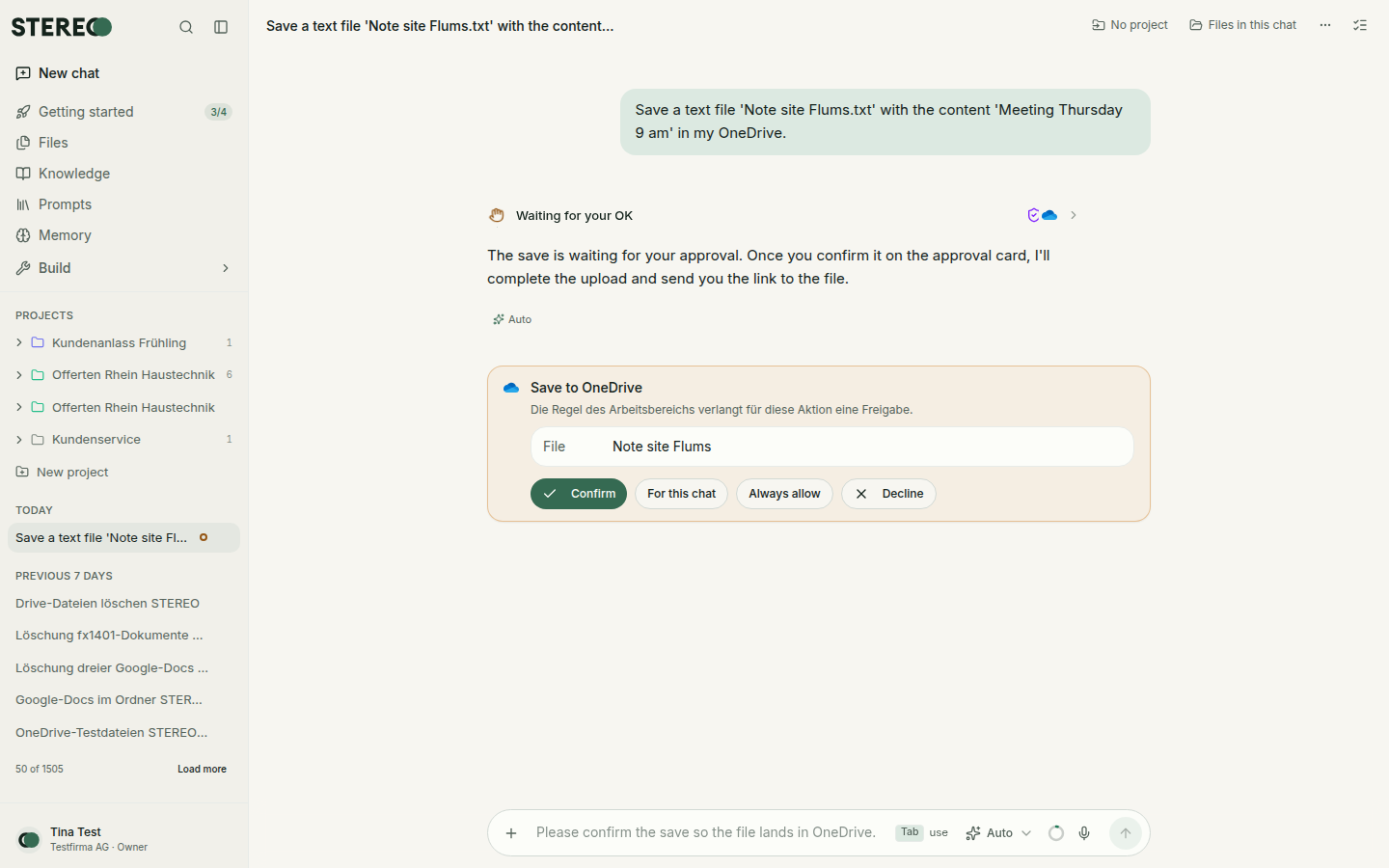
What you can do on the card
- Confirm (for emails Send): STEREO carries out the action exactly as shown on the card.
- Decline: Nothing happens. If you want something different, just say so in the chat.
- For this chat: This action runs without asking in this chat from now on.
- Always allow: This action always runs without asking from now on.
The card waits until you decide. There is no deadline; you can come back to the chat later.
Change details before confirming
For many actions you can change the details right on the card, for example recipients, subject and text of an email, or start and end of an appointment. Click into the field, change the value, then confirm.
- Below the card you see what you changed, for example Changed: Subject.
- Reset brings back STEREO's values.
- STEREO carries out the action with your values. Afterwards the chat still shows which fields you changed, with the new and the old value.
The change is also recorded in the audit log: what STEREO suggested and what you made of it.
«For this chat» and «Always allow»
The two buttons only appear if your company allows it. Admins turn this on under Settings › Integrations with Individuals can loosen rules, see Manage integrations.
Sending, deleting and payments always ask, even if you allow everything else. These actions don't show the two buttons. An allowed action also asks again when a security note is needed.
You find remembered approvals under Settings › Preferences › Remembered approvals. You can revoke them there at any time. After that, STEREO asks again.
Security note on the card
Emails, files and web pages can contain hidden instructions to the AI. That's why STEREO asks in these cases even if the action would otherwise run without asking:
- Text from a web page: if STEREO carries longer passages word for word from the web into an action that changes or sends something, a card appears.
- Text from emails, files and connected apps: a card only appears if something would have a lasting effect: when STEREO is to remember the text or create a skill from it. Reply drafts and analyses work as usual.
The card then shows Security note: with the reason, for example "This action processes data from an untrusted source." Check the details before you agree. If you didn't ask for the action yourself, click Decline.
If the recipient address of an email only comes from an email, file or web page that STEREO read, and you didn't name it yourself, the send card says: "The recipient address comes from an email, file, or web page that was read, not from you."
What your company sets
What STEREO may do at all is set by admins per action: Always allow, Ask first or Blocked. That is the upper limit for everyone. You can only make an action stricter for yourself. More under Rights per action.
Was this helpful?